Nat Gateway
Motivation
Sometimes, you need some simple way of “proxying” traffic between regions or subnets. One of the simplest and most performant ways to do that is using NAT.
The thing is, with a “classic” proxy, you create at least two connections, and it often operates at the application layer of the OSI model. But actually, in many cases, simple IP packet forwarding is enough.
An example could be cross-region VPN access, where the goal is to have a server in region A and redirect TCP/UDP traffic coming to, let’s say, port 4443, to a VPN server in region B. In that case, you basically just need to rewrite the UDP packet destination IP address, which is an L3 operation, while selecting the packets by looking at the destination port, which is L4. This method does not require heavy encryption or application-level processing, and it runs entirely in kernel space.
In Linux, there is a kernel framework called netfilter, which is responsible for packet filtering, NAT, and traffic redirection.
Historically, there was the iptables user-space utility for defining packet filtering and NAT rules. But since Linux kernel 3.13, a more modern tool exists: nftables. Conceptually, nftables uses a small virtual machine inside the kernel, which executes bytecode-like rules to inspect packets, match conditions, and apply actions such as filtering, NAT, or marking packets.
So let’s configure simple nftables rules that combine firewalling and IPv4 traffic redirection, walking through each part along the way, and finish with the complete config file.
Set up
Enable IP forwarding
Before nftables can redirect anything, the kernel must be allowed to forward packets between interfaces. Otherwise, every packet that arrives for another address is dropped immediately.
Check whether forwarding is enabled:
sysctl net.ipv4.ip_forwardIf it prints 0, enable it and persist the setting across reboots:
sudo sysctl -w net.ipv4.ip_forward=1
echo 'net.ipv4.ip_forward=1' | sudo tee /etc/sysctl.d/99-forwarding.conf
sudo sysctl --system
Start from a clean ruleset
Our config begins with flush ruleset, which removes all existing nftables rules before applying the new ones. Be careful with this on a remote server: if the new rules are wrong, you can accidentally lock yourself out.
The filter table: which traffic is allowed
The inet family applies to both IPv4 and IPv6. The filter table defines what traffic may reach this machine itself, what may be forwarded through it, and what it may send out, via three chains:
inputhaspolicy drop, so everything not explicitly allowed gets dropped. The rules accept already-established connections (so replies to our own outgoing traffic still work), loopback traffic, and incoming SSH, HTTP and HTTPS on ports22,80and443.forwardhaspolicy accept, so anything may be forwarded through the machine. The NAT rules decide what actually gets redirected, so forwarding itself stays open.outputhaspolicy accept, so the machine may send any traffic out.
The nat table: rewriting packet destinations
The ip nat table (IPv4 only) is what actually redirects the traffic. It works in two steps, in two chains:
In prerouting, we catch incoming TCP and UDP traffic on port 4443 before the kernel decides where to send it, and rewrite its destination to the backend server 2.2.2.2. Since we don’t specify another port, the original port is preserved: this_machine:4443 becomes 2.2.2.2:4443.
In postrouting, we apply masquerade to traffic going to that backend. This rewrites the source address to the gateway’s own, so replies from the backend come back through the same path and nftables/conntrack can translate them back to the original client.
The extra tun0 masquerade rule is useful when the same machine also works as a VPN gateway, though in a stricter setup I’d usually limit it by subnet and outgoing interface.
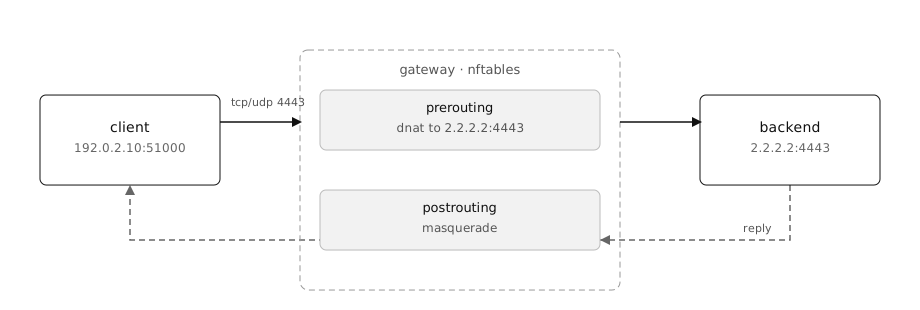
The client hits the gateway on 4443; prerouting rewrites the destination, postrouting rewrites the source of the reply.
The complete config
Putting it all together, create /etc/nftables.conf:
sudo vi /etc/nftables.conf#!/usr/sbin/nft -f
flush ruleset
table inet filter {
chain input {
type filter hook input priority 0; policy drop;
ct state established,related accept
iifname "lo" accept
tcp dport 443 accept
tcp dport 80 accept
tcp dport 22 accept
}
chain forward {
type filter hook forward priority 0; policy accept;
}
chain output {
type filter hook output priority 0; policy accept;
}
}
table ip nat {
chain prerouting {
type nat hook prerouting priority dstnat; policy accept;
tcp dport { 4443 } dnat to 2.2.2.2
udp dport { 4443 } dnat to 2.2.2.2
}
chain postrouting {
type nat hook postrouting priority srcnat; policy accept;
ip daddr 2.2.2.2 tcp dport { 4443 } masquerade
ip daddr 2.2.2.2 udp dport { 4443 } masquerade
iifname "tun0" masquerade
}
}Running
Apply the new config and restart the service:
sudo nft -f /etc/nftables.conf
sudo systemctl restart nftables
sudo systemctl status nftables
If all is good, enable the service:
sudo systemctl enable nftablesYou may also use iftop for network monitoring.