Arkenfox
Intro
Firefox is a decent browser for privacy out of the box, but a lot is still on by default: telemetry, sponsored suggestions, background connectivity checks, autoplay, and so on. arkenfox is a long-running community user.js preset that turns most of it off.
The mechanism is simple. Firefox reads user.js from the profile directory on every start and applies the prefs listed there. The preset documents every pref it sets, so you can read why it exists and override whatever breaks your workflow.
Below is the full setup on macOS. On Linux everything is the same, only the profile path changes.
Setup
1. Create a separate profile
Open about:profiles and create a new profile, e.g. hardened. Keeping it separate from your daily profile lets you compare behavior and keeps the hardened setup away from the browser you actually use.
The profile lands in:
~/Library/Application Support/Firefox/Profiles/<profile-id>.hardened
about:profiles shows the exact path. The commands below use a PROFILE variable instead of the full path, and repeat it in each block so you can paste them as-is.
2. Back up the fresh profile
PROFILE="$HOME/Library/Application Support/Firefox/Profiles/<profile-id>.hardened"
cp -R "$PROFILE" "$PROFILE.bak"
3. Clone arkenfox
git clone https://github.com/arkenfox/user.js.git ~/arkenfox4. Copy the scripts into the profile
PROFILE="$HOME/Library/Application Support/Firefox/Profiles/<profile-id>.hardened"
cd ~/arkenfox
cp user.js updater.sh prefsCleaner.sh "$PROFILE"/
No sudo here: the profile belongs to your user, and root-owned files inside it will make the updater fail later.
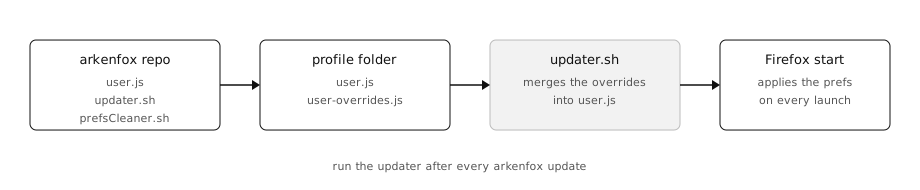
How the files fit together: the repo, the profile, the updater, and what Firefox applies at start.
5. Write user-overrides.js
user.js is the upstream preset; user-overrides.js is applied on top of it and holds your own choices. Create it next to user.js in the profile folder. Mine keeps the hardening but leaves the profile usable for everyday browsing:
// background checks
user_pref("network.captive-portal-service.enabled", false);
user_pref("network.connectivity-service.enabled", false);

// address bar: no suggestions, no history
user_pref("keyword.enabled", true);
user_pref("browser.fixup.dns_first_for_single_words", false);
user_pref("browser.fixup.alternate.enabled", false);
user_pref("browser.search.suggest.enabled", false);
user_pref("browser.search.suggest.enabled.private", false);
user_pref("browser.urlbar.suggest.searches", false);
user_pref("browser.urlbar.suggest.engines", false);
user_pref("browser.urlbar.showSearchSuggestionsFirst", false);
user_pref("browser.urlbar.quicksuggest.enabled", false);
user_pref("browser.urlbar.suggest.quicksuggest.all", false);
user_pref("browser.urlbar.suggest.quicksuggest.sponsored", false);
user_pref("browser.urlbar.suggest.trending", false);
user_pref("browser.urlbar.suggest.history", false);
user_pref("browser.urlbar.suggest.bookmark", false);
user_pref("browser.urlbar.suggest.openpage", false);
user_pref("browser.urlbar.suggest.topsites", false);
user_pref("browser.urlbar.autoFill", false);
user_pref("browser.urlbar.speculativeConnect.enabled", false);
user_pref("browser.urlbar.trimURLs", false);

// no form history
user_pref("browser.formfill.enable", false);

// blank new tab, restore previous session
user_pref("browser.startup.page", 3);
user_pref("browser.startup.homepage", "about:blank");
user_pref("browser.newtabpage.enabled", false);
user_pref("browser.newtabpage.activity-stream.enabled", false);
user_pref("browser.newtab.preload", false);

// session restore, no undo history
user_pref("browser.sessionstore.resume_from_crash", true);
user_pref("browser.sessionstore.max_serialize_back", 0);
user_pref("browser.sessionstore.max_serialize_forward", 0);
user_pref("browser.sessionstore.max_tabs_undo", 0);
user_pref("browser.sessionstore.max_windows_undo", 0);
user_pref("browser.sessionstore.interval", 15000);

// password manager, no autofill
user_pref("signon.rememberSignons", true);
user_pref("signon.autofillForms", false);

// clear cookies and cache on shutdown, keep history and site exceptions
user_pref("privacy.sanitize.sanitizeOnShutdown", true);
user_pref("privacy.clearOnShutdown.history", false);
user_pref("privacy.clearOnShutdown_v2.historyFormDataAndDownloads", false);
user_pref("privacy.clearHistory.historyFormDataAndDownloads", false);
user_pref("privacy.clearOnShutdown.siteSettings", false);
user_pref("privacy.clearOnShutdown_v2.siteSettings", false);
user_pref("privacy.clearOnShutdown.cookies", true);
user_pref("privacy.clearOnShutdown_v2.cookiesAndStorage", true);
user_pref("privacy.clearOnShutdown.cache", true);
user_pref("privacy.clearOnShutdown_v2.cache", true);
user_pref("privacy.clearOnShutdown.offlineApps", true);
user_pref("privacy.clearOnShutdown.downloads", true);
user_pref("privacy.clearOnShutdown.formdata", true);

// https-only, strict tracking protection
user_pref("browser.contentblocking.category", "strict");
user_pref("dom.security.https_only_mode", true);
user_pref("dom.security.https_only_mode_pbm", true);
user_pref("network.http.referer.XOriginTrimmingPolicy", 2);
user_pref("dom.private-attribution.submission.enabled", false);

// no geolocation
user_pref("permissions.default.geo", 2);
user_pref("geo.enabled", false);
user_pref("geo.provider.network.url", "");

// no telemetry or studies
user_pref("datareporting.healthreport.uploadEnabled", false);
user_pref("datareporting.policy.dataSubmissionEnabled", false);
user_pref("toolkit.telemetry.enabled", false);
user_pref("toolkit.telemetry.unified", false);
user_pref("toolkit.telemetry.archive.enabled", false);
user_pref("app.shield.optoutstudies.enabled", false);
user_pref("app.normandy.enabled", false);
user_pref("app.normandy.api_url", "");

// safe browsing off: fewer google calls, weaker phishing protection
user_pref("browser.safebrowsing.malware.enabled", false);
user_pref("browser.safebrowsing.phishing.enabled", false);
user_pref("browser.safebrowsing.downloads.enabled", false);
user_pref("browser.safebrowsing.downloads.remote.enabled", false);
user_pref("browser.safebrowsing.provider.google4.dataSharing.enabled", false);
user_pref("browser.safebrowsing.provider.google4.updateURL", "");
user_pref("browser.safebrowsing.provider.google4.gethashURL", "");
user_pref("browser.safebrowsing.provider.google.updateURL", "");
user_pref("browser.safebrowsing.provider.google.gethashURL", "");

// camera, mic, screen: ask first
user_pref("permissions.default.camera", 0);
user_pref("permissions.default.microphone", 0);
user_pref("permissions.default.screen", 0);
user_pref("permissions.default.desktop-notification", 2);
user_pref("permissions.default.xr", 2);

// autoplay off
user_pref("media.autoplay.default", 5);
user_pref("media.autoplay.blocking_policy", 2);

// gamepads and sensors off
user_pref("dom.webmidi.enabled", false);
user_pref("dom.gamepad.enabled", false);
user_pref("device.sensors.enabled", false);
user_pref("dom.vibrator.enabled", false);

// webrtc: don't leak local ips
user_pref("media.peerconnection.ice.default_address_only", true);
user_pref("media.peerconnection.ice.no_host", true);

// pocket, sync, drm off
user_pref("extensions.pocket.enabled", false);
user_pref("identity.fxaccounts.enabled", false);
user_pref("media.eme.enabled", false);
A few lines there are worth a second thought:
- Safe Browsing is disabled. That removes Google-related network calls, but also weakens malware and phishing protection — a fair trade only if you know what you are doing.
- Cookies and site storage are cleared on shutdown. Sites you want to stay logged in need an exception, otherwise you will re-authenticate on every launch.
- Sync, Pocket and DRM are off. Remove those lines if you use Firefox Sync, Pocket, or DRM-protected streaming.
6. Run the updater
Close Firefox first, then:
PROFILE="$HOME/Library/Application Support/Firefox/Profiles/<profile-id>.hardened"
cd "$PROFILE"
chmod u+x updater.sh prefsCleaner.sh
./updater.sh
./prefsCleaner.sh
updater.sh rebuilds user.js from the upstream release and appends your overrides; prefsCleaner.sh drops prefs that no longer exist upstream. Run both again after every arkenfox update.
7. Start Firefox and finish
Start Firefox and check that it comes up normally. Then:
- install uBlock Origin;
- add cookie exceptions for the sites you want to stay logged in: Settings → Privacy & Security → Cookies and Site Data → Manage Exceptions;
- pick the search engine in Settings → Search; the overrides assume DuckDuckGo.